दोस्तों, आज हम बात करेंगे कंप्यूटर (Computer) के बारे में – बिल्कुल simple भाषा में, जैसे कोई friend आपको समझा रहा हो। चाहे आप 10th, 12th के student हों, BCA कर रहे हों, या किसी competitive exam की तैयारी कर रहे हों – तो यह article आपके लिए एकदम सही है। तो चलिए शुरू करते हैं:-
कम्प्यूटर क्या है? – What is Computer in Hindi
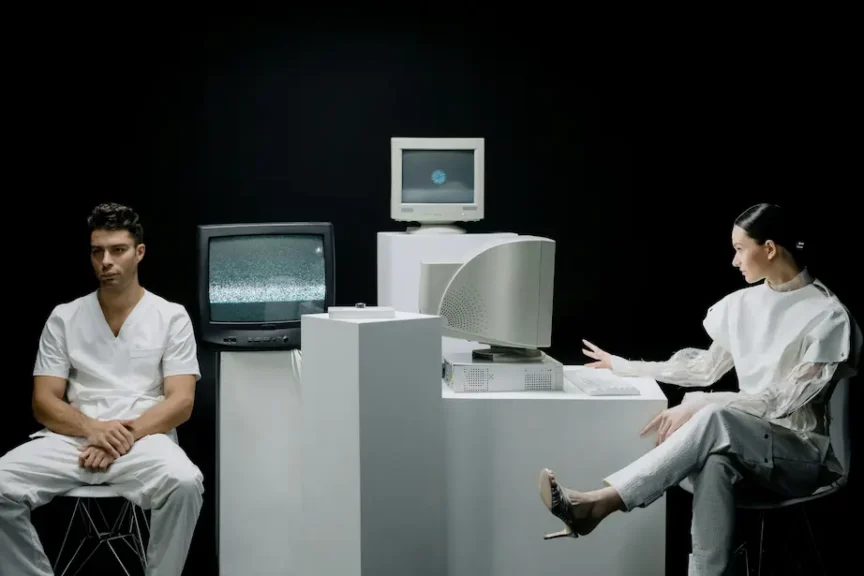
Computer एक electronic device है जो user से data input लेता है, उसे process करता है, और result (output) देता है। यह arithmetic और logical operations बहुत तेज़ गति से कर सकता है।
सोचो – जब आप calculator पर 2+2 करते हो तो वो 4 बता देता है। लेकिन computer सिर्फ यही नहीं करता – वो movies भी चलाता है, internet भी चलाता है, games भी खेलाता है, और documents भी बनाता है! यही computer की power है।
याद रखो: Computer तीन काम करता है - Input लेना → Process करना → Output देना। इसे IPO Cycle कहते हैं।
आज के समय में computer सिर्फ बड़े machine नहीं हैं – आपके pocket में जो smartphone है, वो भी एक powerful computer है! ATM machine, Smart TV, Digital Camera – ये सब computers के ही forms हैं।
Reference Links
- GeeksforGeeks – Computer Basics Computer fundamentals aur basics
- JavaTpoint – What is Computer? Definition, types aur diagram
- Wikipedia – Computer History aur detailed explanation
कम्प्यूटर की परिभाषा – Computer Definition in Hindi
Computer की कई definitions दी गई हैं। चलो इन्हें समझते हैं:
Simple Definition: "Computer एक electronic machine है जो data को input के रूप में लेता है, उसे process करता है, और output के रूप में result देता है।"
Technical Definition: "A computer is a programmable electronic device that accepts raw data as input, processes it through a set of instructions (program), and delivers the result as output."
Computer शब्द Latin word “computare” से आया है, जिसका मतलब है “to calculate” या गणना करना। पहले के ज़माने में “Computer” एक person को कहते थे जो calculations करता था – जैसे mathematician या astronomer। बाद में machine को यह नाम मिला।
Computer के तीन मुख्य components होते हैं:
- पहला – Hardware यानी जो चीज़ें आप छू सकते हैं, जैसे keyboard, mouse, monitor, CPU।
- दूसरा – Software यानी programs और instructions जो आप देख नहीं सकते जैसे Windows, MS Word।
- तीसरा – Data यानी वो information जिसे computer process करता है।
कम्प्यूटर का पूरा नाम – Computer Full Form in Hindi
बहुत से students यह पूछते हैं कि COMPUTER का full form क्या है? तो जान लो – officially computer कोई abbreviation नहीं है, लेकिन exam के लिए एक popular full form use होती है:-
C– Commonly— आमतौर पर
O– Operated— संचालित
M– Machine— मशीन
P– Purposely— उद्देश्यपूर्ण
U– Used for— के लिए उपयोग
T– Technological— तकनीकी
E– Educational— शैक्षणिक
R– Research— अनुसंधान
Exam Tip: Full form है - "Common Operating Machine Purposely Used for Technological and Educational Research", यह form competitive exams में frequently पूछी जाती है!
कम्प्यूटर का परिचय – Computer Introduction in Hindi
Computer को समझने के लिए उसके basic architecture को समझना ज़रूरी है। एक computer में मुख्यतः इन parts होते हैं:
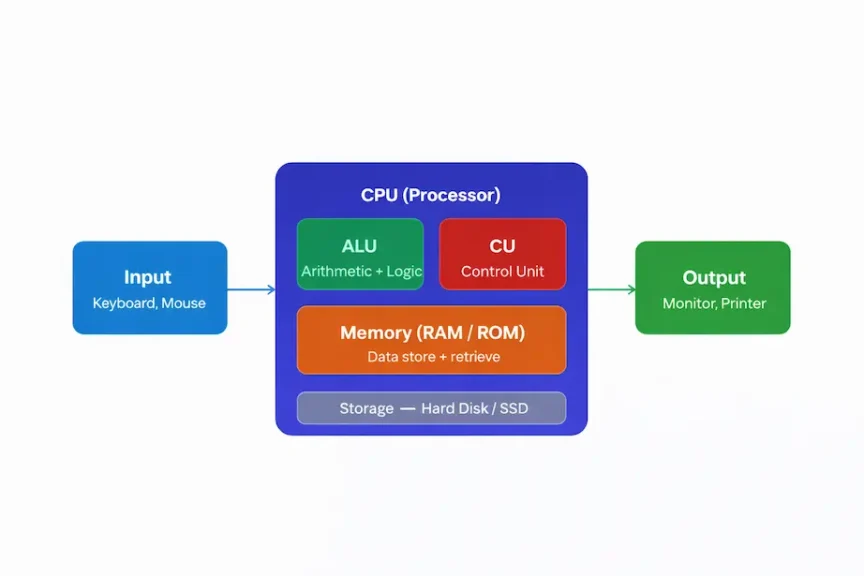
Input → CPU (ALU + CU + Memory) → Output – यही है Computer का basic architecture
ऊपर diagram में आप देख सकते हैं कि computer कैसे काम करता है। Input devices से data आता है, CPU उसे process करता है, जिसमें ALU calculations करता है और CU सब control करता है, और फिर Output devices result दिखाते हैं।
Computer कैसे काम करता है – Working of Computer
Computer का काम करने का तरीका बहुत systematic है। जब आप keyboard पर कुछ type करते हो, वो Input है। CPU उस input को process करता है — calculations करता है, decisions लेता है। फिर result monitor पर दिखता है — वो Output है। यह सब कुछ microseconds में होता है!
और जानें
- TutorialsPoint — Computer Fundamentals, Working, components detail mein
- GFG — Computer Architecture, CPU, Memory, I/O explained
कम्प्यूटर के विभिन्न प्रकार – Types of Computer in Hindi
Computer कई प्रकार के होते हैं – size, speed, और use के हिसाब से। इन्हें दो categories में बाँट सकते हैं:-
A) आकार के आधार पर (Based on Size)
Supercomputer
दुनिया का सबसे powerful computer। Weather forecasting, nuclear research, space exploration में use होता है।
Example: PARAM Shivay (India), Frontier (USA)
Mainframe Computer
बड़ी organizations जैसे banks, governments के लिए। एक साथ हज़ारों users serve कर सकता है।
Example: IBM z15, Unisys ClearPath
Minicomputer
Medium-sized organizations के लिए। Mainframe से छोटा, पर PC से बड़ा। आजकल कम use होता है।
Example: DEC PDP Series, IBM AS/400
Personal Computer (PC)
घर और office में use होने वाला computer। Desktop aur laptop दोनों इसी category में आते हैं।
Example: Dell, HP, Lenovo laptops
Workstation
High-performance, PC। Graphic designers, video editors, engineers के लिए। PC से ज़्यादा powerful होता है।
Example: Apple Mac Pro, HP Z Series
Embedded Computer
किसी device के अंदर built-in computer। Single specific task के लिए designed होता है।
Example: Smart TV, Washing Machine, ATM
B) काम के आधार पर (Based on Purpose)
Analog Computer – continuous data (जैसे temperature, pressure) को process करता है। Speedometer इसका example है।
Digital Computer – Binary digits (0 और 1) में काम करता है। आजकल के सभी computers digital हैं।
Hybrid Computer – Analog और Digital दोनों का combination है। Hospital ICU monitors इसका example हैं।
Exam Important: Supercomputer सबसे fast होता है। India का पहला supercomputer PARAM 8000 था, जो 1991 में C-DAC ने बनाया था।
कम्प्यूटर की विशेषताएं – Characteristics of Computer in Hindi
Computer को इतना popular और useful बनाने वाली उसकी characteristics हैं। आइए इन्हें detail में समझें:-
Speed (गति)
Computer बहुत तेज़ गति से काम करता है। यह एक second में millions of calculations कर सकता है। Speed को MIPS (Millions of Instructions Per Second) में measure करते हैं।
उदाहरण: जो calculation human को 1 घंटा लगे, computer 1 second में करे
Accuracy (सटीकता)
Computer 100% accurate results देता है – बशर्ते input सही हो। यह human errors जैसी गलतियाँ नहीं करता। इसे GIGO principle कहते हैं – Garbage In Garbage Out।
उदाहरण: लाखों का हिसाब, बिना एक पैसे की गलती के किया जा सकता है.
Storage (भंडारण)
Computer में बहुत बड़ी मात्रा में data store किया जा सकता है – text, images, videos, documents सब कुछ। Hard disk, SSD, Pen drive – ये सब storage devices हैं।
उदाहरण: 1TB hard disk में 250,000 songs store हो सकते हैं|
Diligence (अथक परिश्रम)
Computer थकता नहीं है। यह 24 घंटे, 7 दिन बिना break के काम कर सकता है। न distraction, न बोरियत। Quality हमेशा same रहती है।
उदाहरण: Bank servers हर second transactions process करते हैं
Versatility (बहुमुखी प्रतिभा)
Computer एक ही machine पर अनगिनत काम कर सकता है। Medical diagnosis से लेकर movie editing तक, gaming से लेकर banking तक – सब कुछ।
उदाहरण: Same laptop पर coding, music, gaming सब possible हैं.
Automation (स्वचालन)
एक बार program set करने के बाद computer automatically काम करता है। Human intervention की ज़रूरत नहीं होती। यही इसकी सबसे बड़ी strength है।
उदाहरण: Factory robots automatically products assemble करते हैं
Reliability (विश्वसनीयता)
Modern computers बहुत reliable होते हैं। ये consistent results देते हैं और rarely fail होते हैं। Properly maintained computers सालों तक बढ़िया काम करते हैं।
उदाहरण: Bank servers 99.99% uptime maintain करते हैं
Communication (संचार)
Computer networking के ज़रिये दूसरे computers से connect हो सकता है। Internet की वजह से पूरी दुनिया एक network बन गई है। Data sharing आसान हो गया है।
उदाहरण: Email, Video Call, File Sharing – सब computer से
कम्प्यूटर की सीमाएं – Limitations of Computer in Hindi
Computer बहुत powerful है, लेकिन इसकी कुछ limitations भी हैं जिन्हें जानना ज़रूरी है:-
No Intelligence (कोई बुद्धि नहीं)
Computer खुद से कुछ नहीं सोच सकता। यह सिर्फ वही करता है जो program किया गया हो। Common sense नहीं होती। Artificial Intelligence (AI) इस limitation को कम करने की कोशिश है।
No Feelings (भावनाओं का अभाव)
Computer को खुशी, दुख, प्यार, गुस्सा — कुछ नहीं होता। यह machine है। Human emotions को समझ नहीं सकता। एक अच्छा doctor computer कभी नहीं बन सकता।
Electricity Dependent (बिजली पर निर्भर)
Computer को लगातार electricity चाहिए। Power cut होने पर unsaved data loss हो सकता है। बिना power के computer बेकार है।
Virus & Hacking Threats
Computer पर virus attack, hacking, और data theft का खतरा रहता है। Cybersecurity एक बड़ी challenge है। Regular updates और antivirus ज़रूरी हैं।
Health Issues
ज़्यादा computer use से eye strain, back pain, carpal tunnel syndrome जैसी problems हो सकती हैं। Screen time limit करना ज़रूरी है।
No Decision Making
Computer खुद से कोई moral decision नहीं ले सकता। यह right और wrong नहीं जानता। Complex ethical situations में human judgment ज़रूरी है।
याद रखो: Computer जितना powerful है, उतना ही GIGO principle पर depend करता है - "Garbage In, Garbage Out" - यानी गलत input दोगे तो गलत output ही मिलेगा!
कम्प्यूटर का इतिहास – History of Computer in Hindi
Computer का इतिहास बहुत interesting है। यह हज़ारों साल पुरानी कहानी है। आइए step by step जानते हैं:
Pre-Computer Era (कम्प्यूटर से पहले का युग)
इंसान को पहले से numbers count करने की ज़रूरत थी। सबसे पहले Abacus बना – 3000 BC में, यह पहला calculating device था। फिर 1614 में John Napier ने Napier’s Bones बनाई। 1642 में Blaise Pascal ने Pascaline बनाई – पहली mechanical calculator।
Charles Babbage – Father of the Computer
Charles Babbage को “Father of Computer” कहते हैं। उन्होंने 1822 में Difference Engine और 1837 में Analytical Engine का डिज़ाइन किया। Analytical Engine में वो सभी concepts थे जो modern computer में होते हैं – Input, Processing, Output, Storage। उनके साथ Ada Lovelace ने काम किया, जिन्हें first computer programmer कहते हैं।
Modern Computer Era
1945 में ENIAC बना – Electronic Numerical Integrator And Computer, यह पहला general-purpose electronic computer था। इसे J. Presper Eckert और John Mauchly ने बनाया। यह इतना बड़ा था कि पूरे room में था और 30 tons का था!
History के लिए Resources
- GFG – History of Computers, Timeline aur milestones detail mein
- Vedantu – Computer Full Form & History, Exam ke liye complete notes
कम्प्यूटर की पीढ़ियाँ – Computer Generations in Hindi
Computer के development को 5 generations (पीढ़ियों) में बाँटा गया है। हर generation में technology बदल गया और computers बेहतर होते गए। आइए इन्हें detail में समझें:
First Generation (1946–1956)
इस generation में Vacuum Tubes use होते थे। Computers बहुत बड़े, भारी, और महंगे थे। पूरे कमरे में फैले होते थे। बहुत ज़्यादा heat produce करते थे। Programming Machine Language में होती थी। Input के लिए Punch Cards use होते थे। Reliability कम थी और maintenance बहुत ज़्यादा था
- Technology: Vacuum Tubes
- Examples: ENIAC, UNIVAC, IBM 701
Second Generation (1957–1963)
Vacuum Tubes की जगह Transistors आए। Computers छोटे, तेज़, और कम expensive हुए। कम heat produce होती थी। Assembly Language और High-Level Languages जैसे FORTRAN, COBOL use होने लगीं। Magnetic Core memory use होती थी। Reliability पहले से बेहतर हुई।
- Technology: Transistors
- Examples: IBM 1620, CDC 3600, IBM 7094
Third Generation (1964–1971)
Transistors की जगह Integrated Circuits (ICs) आए। एक single IC में हज़ारों transistors! Computers और छोटे, तेज़, और reliable हुए। Operating System का concept आया। BASIC, FORTRAN, COBOL जैसी high-level languages popular हुईं। Minicomputers इसी generation में बने। Time-sharing और multiprogramming शुरू हुई
- Technology: Integrated Circuits (ICs)
- Examples: IBM 360, IBM 370, PDP-11
Fourth Generation (1972–1990s)
Microprocessors का आगमन। एक ही chip पर पूरा CPU! VLSI (Very Large Scale Integration) technology use हुई। Personal Computers (PC) का युग शुरू हुआ। 1981 में IBM PC आया, 1984 में Apple Macintosh। GUI (Graphical User Interface) popular हुई। Mouse का use शुरू हुआ। C, C++ जैसी languages आईं।
- Technology: Microprocessors / VLSI
- Examples: IBM PC, Apple Macintosh, Intel 8086
Fifth Generation (1990s– अब तक)
Artificial Intelligence (AI) और Machine Learning का युग। ULSI (Ultra Large Scale Integration) technology। Internet का explosion। Smartphones, Tablets का आगमन। Voice recognition, Face recognition possible हुआ। Cloud Computing, Big Data, IoT (Internet of Things) इसी generation की देन हैं। आज ChatGPT, Siri, Alexa जैसे AI assistants इसी generation का result हैं।
- Technology: AI / ULSI / Parallel Processing
- Examples: Smartphones, Supercomputers, AI Systems.
Quick Revision Table: 1st: Vacuum Tubes → 2nd: Transistors → 3rd: IC → 4th: Microprocessor/VLSI → 5th: AI/ULSI, यह sequence exam में बहुत काम आती है!
Generations के बारे में और पढ़ें:-
- GFG — Generations of Computers: Detailed explanation with examples
- GFG — Evolution of Generations Technology: changes har generation mein
- Career Power — Computer Notes: Competitive exam ke liye complete notes
Career Opportunities in Computer Field – कम्प्यूटर में करियर
दोस्तों, अगर आप computer में interest रखते हैं, तो आपके लिए career के बेशुमार options हैं! आज IT industry दुनिया की सबसे बड़ी industries में से एक है। India में IT sector में लाखों jobs हैं। आइए देखते हैं कौन-कौन से career options हैं:-
Most Popular
Software Developer / Engineer
Applications और software बनाना। Web apps, mobile apps, desktop software – सब कुछ। Python, Java, JavaScript जैसी languages सीखनी होंगी।
Salary: ₹4–25 LPA (fresher to senior)
High Demand
Data Scientist / AI Engineer
Data analyze करना, Machine Learning models बनाना। AI के इस दौर में यह सबसे hot career है। Python, R, TensorFlow ज़रूरी हैं।
Salary: ₹6–35 LPA
Growing Fast
Cybersecurity Analyst
Systems को hackers से बचाना। Network security, ethical hacking, penetration testing। Cyber threats बढ़ने से demand बहुत ज़्यादा है।
Salary: ₹5–30 LPA
Stable Career
Database Administrator (DBA)
Databases design, maintain और manage करना। SQL, Oracle, MySQL knowledge ज़रूरी। हर बड़ी company को DBA चाहिए।
Salary: ₹4–20 LPA
Creative
UI/UX Designer
Websites और apps को beautiful और user-friendly बनाना। Figma, Adobe XD जैसे tools use होते हैं। Design sense + technical knowledge चाहिए।
Salary: ₹3–18 LPA
Cloud Era
Cloud Engineer / DevOps
AWS, Google Cloud, Azure जैसे cloud platforms manage करना। DevOps में development और operations combine होते हैं। Highly paid role है।
Salary: ₹7–40 LPA
Student Tip: Computer field में career बनाने के लिए BCA, B.Tech (CS/IT), MCA, B.Sc. Computer Science जैसे courses best हैं। Certification courses जैसे AWS, Google, Microsoft certifications भी बहुत काम आते हैं!
FAQs अक्सर पूछे जाने वाले सवाल
Q1. कम्प्यूटर का पूरा नाम क्या है?
Computer का full form है – Common Operating Machine Purposely Used for Technological and Educational Research। यह officially एक abbreviation नहीं है, लेकिन exams में यही पूछा जाता है।
Q2. Computer का आविष्कार किसने किया?
Charles Babbage को Computer का जनक (Father of Computer) कहते हैं। उन्होंने 1837 में Analytical Engine design किया था। पहला इलेक्ट्रॉनिक कंप्यूटर ENIAC को माना जाता है, जो 1945 में बना।
Q3. Computer कितने प्रकार के होते हैं?
Size के आधार पर: Supercomputer, Mainframe, Minicomputer, PC, Workstation, Embedded Computer। Technology के आधार पर: Analog, Digital, Hybrid Computer।
Q4. Computer Generations क्या होती हैं?
Computer के development को 5 generations में बाँटा गया है। पहली generation में Vacuum Tubes थे, दूसरी में Transistors, तीसरी में IC, चौथी में Microprocessors, और पाँचवीं generation में AI और ULSI technology है।
Q5. India का पहला Supercomputer कौनसा था?
India का पहला supercomputer PARAM 8000 था जिसे C-DAC ने 1991 में develop किया था। आज India का most powerful supercomputer PARAM Siddhi-AI है।
Q6. Computer की सबसे बड़ी limitation क्या है?
Computer की सबसे बड़ी limitation यह है कि इसमें intelligence नहीं होती। यह खुद से सोच नहीं सकता, decisions नहीं ले सकता। यह सिर्फ वही करता है जो program किया गया हो। इसे IQ (Intelligence Quotient) नहीं होता।
Q7. Computer Field में best course कौन सा है?
यह depend करता है आपके interest पर। Programming के लिए B.Tech CS, BCA best हैं। Management के साथ technology चाहिए तो MCA। Short-term के लिए certifications जैसे AWS Cloud Practitioner, Google IT Support Certificate बढ़िया हैं।
Also Read: Operating System क्या है?